

For full-day desk work, an ergonomic office chair is the better choice. Its adjustable lumbar support and proper seat depth are built for eight-hour stretches. Gaming chairs suit shorter sessions, esports setups, or anyone who wants that racing-seat look more than all-day back support. Both types are worth shopping carefully, since features vary wildly between budget and premium models.
TL;DR:
- Ergonomic office chairs with adjustable lumbar support and seat depth offer long-term comfort for eight-hour workdays, unlike fixed-bolster gaming chairs.
- Fixed-bucket racing seats used by gaming chairs provide reactive support suited for short, high-intensity sessions, not sustained sitting.
- Materials matter: mesh backs with high-density foam generally last longer and breathe better than PU leather, which peels within a few years.
- Features like 4D adjustable armrests and sliding seat pans significantly improve comfort during prolonged sitting, especially in ergonomic models.
- Spending more than $150 on a chair is advisable if sitting six or more hours daily, with premium models lasting longer and providing better support.
Table of Contents
- Gaming chair or office chair? The quick comparison
- Design and typical features: how the categories differ and why it matters
- Ergonomics and back health: what the evidence actually says
- Materials, breathability and durability: what actually holds up
- Price and value: what you’re actually paying for
- Buyer profiles: who should pick which chair
- How to choose a chair: your shopping checklist
- ValuHub picks: matching chairs to how you actually sit
- Why we look past the marketing labels
- Sources
- FAQ
Gaming chair or office chair? The quick comparison
If you sit for work most of the day, an ergonomic office chair wins on almost every practical measure: adjustable lumbar depth, breathable mesh, and a seat pan built for hours, not minutes. A gaming chair earns its keep for shorter, high-intensity sessions or when style matters as much as support.
Here’s the trade-off in plain terms:
- Office chairs: better lumbar adjustability, mesh breathability, and proven long-term comfort for seated work.
- Gaming chairs: bold aesthetics, deep recline, and bolstered side support built for competitive posture, not spreadsheet posture.
- Hybrid models: split the difference with integrated lumbar systems inside a gaming-style shell.
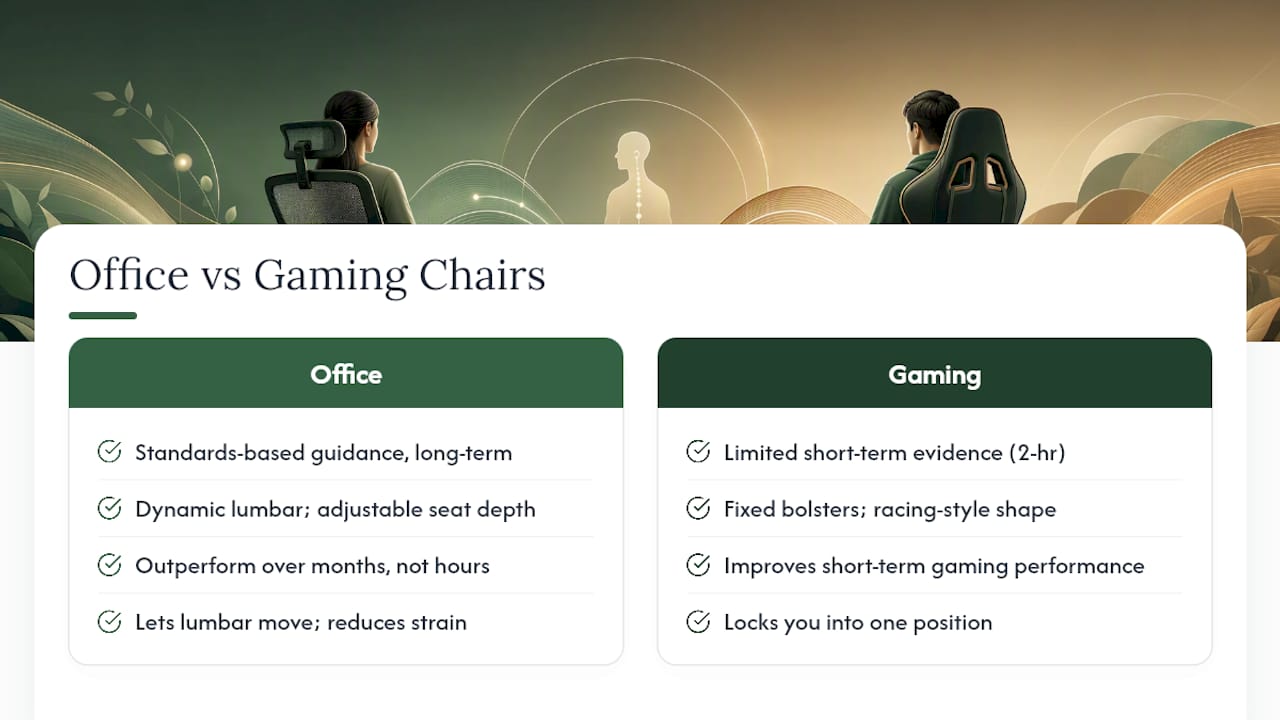
A 2024 preprint on chair choice and muscle stiffness found gamers using a gaming chair during two-hour League of Legends sessions had about 4.1% less lumbar stiffness and 13.8% less thoracic stiffness than those using a Herman Miller Aeron. That’s a real signal for short, high-intensity gaming, but the sample was small and gaming-specific, so it doesn’t translate into a verdict for someone typing emails for eight hours straight.
Design and typical features: how the categories differ and why it matters
Bucket seats and S-curve backs are not the same piece of furniture wearing different fabric. Gaming chairs borrow their shape from racing seats: high side bolsters, a steep bucket profile, and a backrest built to hold your torso still during quick, reactive movements. Office chairs, especially ergonomic ones, use an S-curve back designed to follow your spine’s natural shape through long, static sitting.
Seat pan shape and depth matter more than most shoppers realize. A seat that’s too deep pushes the backrest away from your lower back, forcing you to slump forward to reach the desk. A seat that’s too shallow leaves your thighs unsupported and your circulation working overtime. Office chairs typically offer seat-depth sliders. Gaming chairs, built around a fixed bucket shape, usually don’t.
Armrests tell a similar story:
- Fixed or single-direction armrests (common on budget gaming chairs) force your shoulders into whatever position the armrest dictates.
- 4D adjustable armrests (height, width, depth, and pivot) let you rest your forearms at true elbow height, cutting shoulder and neck strain during typing.
- Flip-up armrests on some hybrids solve a narrow desk-clearance problem but don’t fix shoulder loading on their own.
The practical effect shows up after a few weeks, not a few minutes. A gaming chair with fixed bolsters might feel supportive on day one and start pinching your hips by week three, while an ergonomic chair with a sliding seat pan and 4D arms lets you fine-tune the fit as your posture habits reveal themselves.
Ergonomics and back health: what the evidence actually says
Chair marketing loves the word “ergonomic,” but the research behind that claim is narrower than the label suggests. The same medRxiv preprint that measured reduced muscle stiffness in gamers also measured performance metrics, and the improvements showed up specifically in a two-hour, high-intensity gaming context with a small cohort. That’s useful if you’re a competitive gamer wondering whether a racing-style chair helps your reflexes. It’s not evidence that the same chair protects your spine through a nine-to-five workday.
Movement, not stillness, is what actually protects your spine. Ergonomics guidance consistently points to posture variation, adjustable lumbar support, and correct seat depth as the real drivers of long-term comfort, not any single chair’s shape or price tag.
Standards-based guidance, including frameworks referenced in ergonomics and spinal comfort research, recommends dynamic lumbar support and adjustable seat depth as baseline features for anyone sitting most of the day. That guidance doesn’t ban gaming chairs outright, but it does explain why office chairs with sliding lumbar height and seat-depth adjustment tend to outperform fixed-bolster gaming chairs over months, not hours.
Here’s the practical takeaway: a chair that lets your lumbar support move with you, and lets you shorten or lengthen the seat pan to match your leg length, reduces the accumulated strain that builds from sitting the same way for years. A chair that locks you into one position, however supportive that position feels on day one, asks your spine to adapt to it rather than the other way around. That distinction is exactly why Tom’s Guide’s comparative testing concludes office chairs generally win on ergonomics and long-term value, while gaming chairs win on looks and recline depth.
Materials, breathability and durability: what actually holds up
PU leather looks sharp in product photos and traps heat within the first hour of sitting. Mesh backing, by contrast, lets air move and keeps you in contact with the backrest instead of shifting every ten minutes to cool off. Buyer guides comparing the two note that PU leather commonly peels or cracks within one to three years of regular use, especially in warmer rooms or near sunlit windows, while mesh holds its shape and breathability far longer.
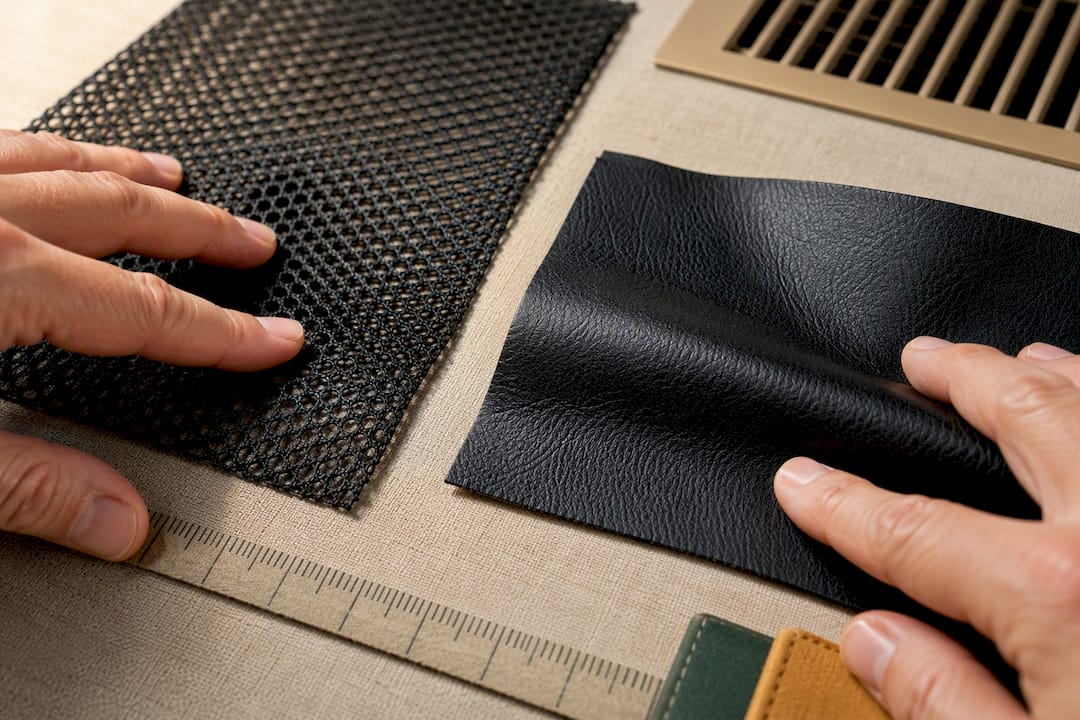
Foam density is the other quiet differentiator. High-density foam resists compression and holds its support for years; low-density foam flattens into a pancake within months, which is why a chair can feel great in the showroom and disappointing by month four. The base and tilt mechanism matter just as much. A pneumatic cylinder and a locking tilt tension knob that feel smooth in the store are early signs of a chair built to last; one that wobbles or clicks under moderate weight is a preview of failure.
To check quality before you buy:
- Look for named foam density figures in the listing (higher density numbers signal firmer, longer-lasting cushioning).
- Check whether the lumbar support is integrated and adjustable, or a strap-on pillow that will drift out of place within weeks.
- Read the warranty length as a proxy for how long the manufacturer expects the frame and mechanism to hold up.
Pro Tip: If a listing shows a mesh back and an integrated adjustable lumbar system, that combination is one of the more reliable indicators of all-day comfort, regardless of whether the chair is marketed as “gaming” or “office.”
Price and value: what you’re actually paying for
Budget chairs in both categories, roughly under $150, tend to use lower-density foam, basic pneumatic lifts, and either a fixed lumbar curve or a strap-on pillow that slides out of position. They’ll get you through a semester or a job’s first year, not much longer.
Mid-range chairs, generally $150 to $400, are where the real gap between categories narrows. A mid-range ergonomic office chair typically adds seat-depth sliding, 4D armrests, and a genuinely adjustable lumbar mechanism. A mid-range gaming chair adds better foam and a sturdier frame but usually keeps the fixed bucket shape and strap-on pillow.
Premium chairs above $400 in either category usually come with longer warranties and noticeably longer real-world lifespans, since the frame, casters, and tilt mechanism are built to commercial-grade tolerances rather than consumer-grade ones.
Here’s when the extra spend is justified:
- Spend more on an ergonomic chair if you sit six or more hours a day. The adjustability pays for itself in avoided back and shoulder strain.
- Stay mid-range on a gaming chair if your sessions are short. Premium bolstering has diminishing returns once you’re not moving reactively for hours.
- Skip ultra-budget options entirely if you sit daily. The foam and mechanism failures show up faster than the sticker price suggests.
Buyer profiles: who should pick which chair
- All-day remote worker. An ergonomic office chair with sliding lumbar support and a seat-depth adjustment is the clear pick. Six-plus hours of daily sitting is exactly the use case adjustable lumbar support was designed for.
- Mixed work-and-gamer household. A hybrid chair, or a well-reviewed gaming chair with integrated (not strap-on) lumbar support, is the practical middle ground: gaming-style aesthetics without sacrificing daytime posture support.
- Streamer or competitive gamer. A racing-style gaming chair with deep recline and strong bolstering fits the reactive, short-session movement pattern competitive gaming demands.
- Casual gamer with short sessions. Either category works fine here. Fit and comfort matter more than the ergonomic feature list, since sessions rarely stretch past an hour or two.
- Budget shopper. Look for the best foam density and warranty length you can find in your price range, regardless of category label, since those two factors predict lifespan better than the “gaming” or “office” name on the box.
Before buying in any profile, confirm the seat width and weight capacity match your build, and check that armrest height range fits your desk’s clearance.
How to choose a chair: your shopping checklist
Work through these questions before you buy, in this order:
- How many hours a day will you actually sit in it? Under two hours, either category works. Over four, prioritize an ergonomic chair.
- Does the listing specify seat depth and lumbar adjustment range? If it doesn’t mention either, assume it’s fixed.
- Are the armrests 4D, or just height-adjustable? 4D armrests are worth the upgrade for daily desk use.
- What’s the recline range, and do you need it? Deep recline matters for gaming breaks, less so for typing.
- Is the upholstery mesh or PU leather, and does your room run warm? Mesh wins in warmer spaces or for anyone who runs hot while sitting.
- What’s the listed weight capacity, and does it comfortably exceed your own? Buy above your weight, not right at the limit.
- What’s the warranty length, and does it cover the tilt mechanism specifically? A warranty that excludes the mechanism isn’t much of a warranty.
- What’s the return window if the fit is wrong once it arrives?
If you’re shopping in person, sit for a full five minutes, not thirty seconds. Lean back, lean forward, and rotate your shoulders to feel whether the lumbar support stays in contact or slips.
Pro Tip: Bring a printed page with your desk height and preferred seat height range when chair shopping in-store. It takes the guesswork out of comparing armrest and seat measurements on the spot.
ValuHub picks: matching chairs to how you actually sit
Once you know your profile, the right ValuHub chair is easier to spot. For the all-day remote worker who needs room to recline and stretch during long shifts, the Big and Tall Office Chair with Footrest offers a high back, reclining function, and extra seat capacity built for extended sitting rather than short bursts.
For the competitive gamer or streamer who wants the racing-seat look with real functional extras, the Racing Gaming Chair with Tilt Function pairs a padded headrest and swivel wheels with a tilt mechanism suited to reactive, high-energy sessions.
If you’re building out a full gaming or hybrid workstation rather than just swapping a chair, the Gaming Desk with Power Outlets and LED Lights rounds things out with built-in cable management and monitor support, so the chair isn’t fighting an awkward desk setup.
Shoppers who want an ergonomic-leaning option with a gaming-style frame can also check ValuHub’s high-back racing style office chair, a hybrid pick for mixed-use households.
Why we look past the marketing labels
Most chair marketing leans hard on the word “ergonomic” without backing it up with adjustability that actually matters. That’s the gap Valuhub’s team pays attention to: a chair’s category name tells you almost nothing about whether its lumbar support moves, whether its seat pan slides, or whether its foam will still have shape in a year. Those specifics are what separate a good long-term chair from a good-looking one.
Our product selection leans toward chairs and desks with verifiable adjustability and materials, because that’s what determines whether a purchase pays off. Ongoing feedback from Canadian shoppers on fit and durability continues to shape how we round out ValuHub’s home office lineup.
— ValuHub Team
Sources
- Aeron vs. Gaming Chair - Performance, Perception and Muscle Stiffness (medRxiv preprint)
- Ergonomics and spinal comfort review (PMC open access article)
- Office chair vs gaming chair: Which is better for your home office? | Tom’s Guide
- Ergonomic chair vs gaming chair guide — DeskFinds
FAQ
Are gaming chairs better for office work?
Not usually. Office work rewards adjustable lumbar support and seat depth, features most gaming chairs skip in favor of fixed bolstering and racing-seat styling.
Which is best, an office chair or a gaming chair?
An ergonomic office chair suits daily desk work best, while a gaming chair suits short, high-intensity sessions or buyers who prioritize style and deep recline.
Are gaming chairs actually good for your back?
They can be adequate for short sessions. A small 2024 preprint study found reduced muscle stiffness during two-hour gaming sessions, but the sample was small and gaming-specific, so it doesn’t prove long-term back health benefits for desk work.
What is so special about a gaming chair?
Bold aesthetics, deep recline angles, and side bolsters designed for reactive, high-energy movement rather than static, all-day sitting.
Is a gaming chair or ergonomic office chair better for mixed work and gaming?
A hybrid chair or a gaming chair with integrated (not strap-on) lumbar support tends to work best, since it balances gaming-style comfort with the adjustability daily desk work needs.
Recommended
- Office Chair, Comfortable Computer - Black
- Office Chair High Back Racing Style Gaming
- Ergonomic Saddle Stool with Wheels - White
- Computer Desk Table Home Office Furniture
Made with BabyLoveGrowth to reach people on Google and AI search


